


Despite the previous caveats, there are situations where sharing a stream buffer among streams is useful and intended. Let us focus on these in this section.
Imagine you need different formatting for different kinds of output to the same stream. Instead of switching the format settings between the different kinds of output, you can arrange for two separate streams to share a stream buffer. The streams would have different format settings, but write output to the same stream buffer. Here is an example:
ofstream file1("/tmp/x");
ostream file2(file1.rdbuf());                                 //1

file1.setf(ios_base::fixed, ios_base::floatfield);            //2
file1.precision(5);
file2.setf(ios_base::scientific, ios_base::floatfield);
file2.precision(3);

file1 << setw(10) << 47.11 << '\n';                           //3
file2 << setw(10) << 47.11 << '\n';                           //4
| //1 | The stream buffer of file1 is replaced by the stream buffer of file2. Afterwards, both streams share the buffer. |
| //2 | Create different format settings for both files. |
| //3 | The output here will be: 47.11000 |
| //4 | The output here will be: 4.711e+01 |
Note that file2 in the example above has to be an output stream rather than an output file stream. This is because file streams do not allow you to switch the file stream buffer.
Similarly, you can use separate streams that share a stream buffer in order to avoid locale switches. This is useful when you have to insert multilingual text into the same stream. Here is an example:
  ostringstream file1;
  ostream file2(file1.rdbuf());

  file1.imbue(locale("De_DE"));
  file2.imbue(locale("En_US"));

  file1 << 47.11 << '\t';
  file2 << 47.11 << '\n';

  cout << file1.str() << endl;                                //1
| //1 | The output will be: 47,11 47.11 |
Again, there is a little snag. In Figure 32, note that a stream buffer has a locale object of its own, in addition to the stream's locale object.
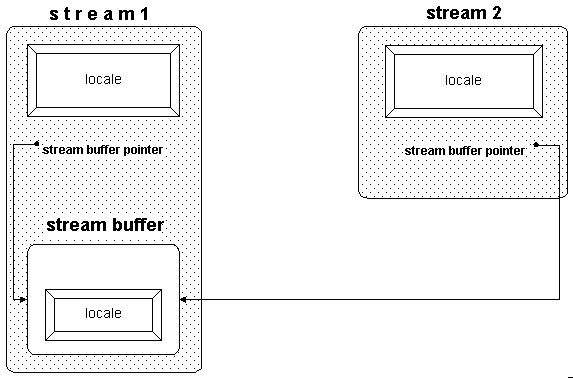
Section 6.4.4 explained the role of those two locale objects. To recap, the stream delegates the handling of numeric entities to its locale's numeric facets. The stream buffer uses its locale's code conversion facet for character-wise transformation between the buffer content and characters transported to and from the external device.
Usually the stream's locale and the stream buffer's locale are identical. However, when you share a stream buffer between two streams with different locales, you must decide which locale the stream buffer will use.20
You can set the stream buffer's locale by calling the pubimbue() function as follows:
file1.imbue(locale("De_DE"));
file2.imbue(locale("En_US"));
file1.rdbuf()->pubimbue(locale("De_DE"));
You can also use a shared stream buffer in order to have read and write access to a stream:
filebuf fbuf;                                                 //1
  fbuf.open("/tmp/inout",ios_base::in|ios_base::out);         //2
  istream in(&fbuf);                                          //3
  ostream out(&fbuf);                                         //4

  cout << in.rdbuf();                                         //5
  out << "..." << '\n' ;                                      //6
| //1 | Create a file buffer, and |
| //2 | Connect it to a file. Note that you have to open the file in input and output mode if you want to read and write to it. |
| //3 | Create an input stream that works with the file buffer fbuf. |
| //4 | Create an output stream that also uses the file buffer fbuf. |
| //5 | Read the entire content of the file and insert it into the standard output stream. Afterwards the file position is at the end of the file.
The most efficient way to read a file's entire content is through the rdbuf() function, which returns a pointer to the underlying stream buffer object. There is an inserter available that takes a stream buffer pointer, so you can insert the buffer's content into another stream. |
| //6 | Write output to the file. As the current file position is the end of the file, all output will be inserted at the end. |
Naturally, it is easier and less error-prone to use bidirectional streams when you have to read and write to a file. The bidirectional equivalent to the example above would be:
fstream of("/tmp/inout");
  cout << of.rdbuf();
  of << "..." << '\n' ;
Notice that there is a difference between the solutions that you can see by comparing Figure 33 and Figure 34. An input and an output stream that share a stream buffer, as shown in Figure 33, can still have separate format settings, different locales, different exception masks, and so on.
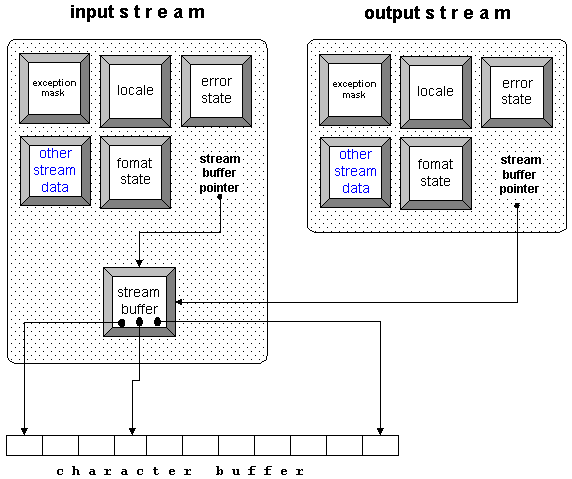
In contrast, the bidirectional stream shown in Figure 34 can have only one format setting, one locale, and so on:
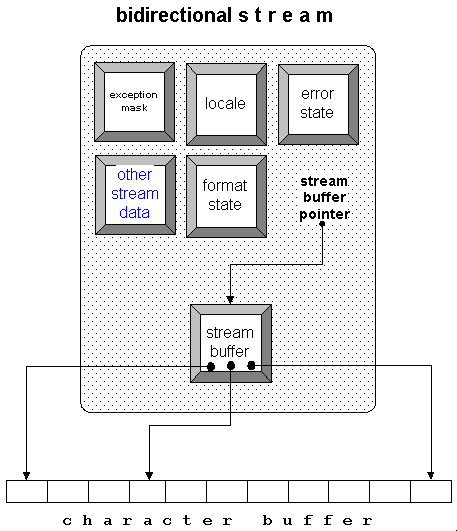
It seems clear that you cannot have different settings for input and output operations when you use a bidrectional stream. Still, it is advisable to use bidirectional file or string streams if you need to read and write to a file or string, instead of creating an input and an output stream that share a stream buffer. The bidirectional stream is easier to declare, and you do not have to worry about the stream buffer object's lifetime.
NOTE: It's better to use one bidirectional file or string stream for reading and writing to a file or string, rather than two streams that share a stream buffer.
©Copyright 1998, Rogue Wave Software, Inc.
Send mail to report errors or comment on the documentation.