


Stream objects cannot simply be copied and assigned. Let us consider a practical example to see what this means. A program writes data to a file if a file name is specified on program call, or to the standard output stream cout if no file name is specified. You want to write to one output stream in your program; this stream will either be a file stream or the standard output stream. The most obvious way to do this is to declare an output file stream object and assign it to cout, or to use cout directly. However, you can't do it this way:
int main(int argc, char argv[])
{
  ofstream fil;
  if (argc > 1)
  {  fil.open(argv[1]);
     cout = fil;                            // never do this !!!
  }
  // output to cout, e.g.
  cout << "Hello world!" << endl;
}
This solution is bad for at least two reasons. First, assignments to any of the predefined streams should be avoided. The predefined stream cin, cout, cerr, and clog have special properties and are treated differently from other streams. If you reassign them, as done with cout in the example above, you lose their special properties. Second, assignment and copying of streams is hazardous. The assignment of the output stream fil will compile and might even work; however, your program is likely to crash afterwards.17
NOTE: Stream objects must never be copied or assigned to each other.
Let us see why. The copy constructor and the assignment operator for streams are not defined18; therefore, the compiler-generated default copy constructor and assignment operator are used. As usual, they only copy and assign a stream object's data members, which is insufficient because a stream object holds pointers as well. Figure 30 provides a sketch of the data held by a stream object:
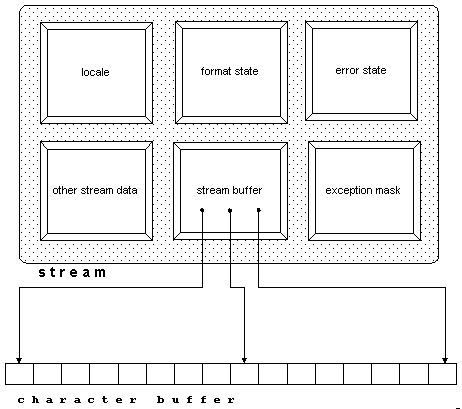
The stream buffer contains several pointers to the actual character buffer it maintains. The default copy constructor and assignment operator will not correctly handle these pointers.
To achieve the equivalent effect of a copy, you might consider copying each data member individually. This can be done as follows:
int main(int argc, char argv[])
{
  ofstream out;
  if (argc > 1)
     out.open(argv[1]);
  else
  {  out.copyfmt(cout);                                       //1
     out.clear(cout.rdstate());                               //2
     out.rdbuf(cout.rdbuf());                                 //3
  }
  // output to out, e.g.
  out << "Hello world!" << endl;
}
| //1 | The copyfmt() function copies all data from the standard output stream cout to the output file stream out, except the error state and the stream buffer. There is a function exceptions() that allows you to copy the exception mask separately, as in cout.exceptions(fil.exceptions()), but you need not do this explicitly, since copyfmt() already copies the exception mask. |
| //2 | Here the error state is copied. |
| //3 | Here the stream buffer pointer is copied. |
Please note the little snag here. After the call to rdbuf(), the buffer is shared between the two streams, as shown in Figure 31:
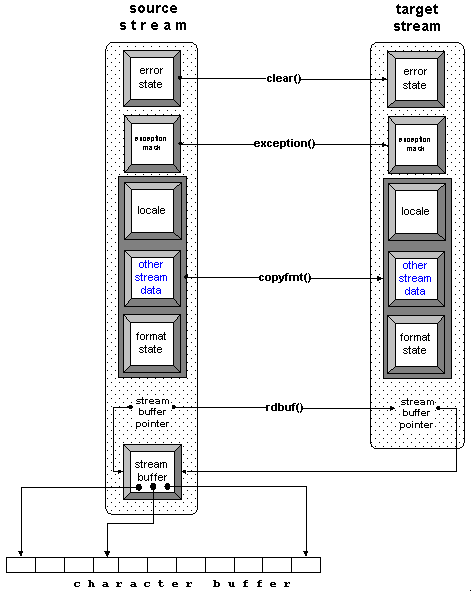
Whether or not you intend to share a stream buffer among streams depends on your application. In any case, it is important that you realize the stream buffer is shared after a call to rdbuf(); in other words, you must monitor the lifetime of the stream buffer object and make sure it exceeds the lifetime of the stream. In our little example above, we use the standard output stream's buffer. Since the standard streams are static objects, their stream buffers have longer lifetimes that most other objects, so we are safe. However, whenever you share a stream buffer among other stream objects, you must carefully consider the stream buffer's lifetime.
The example above has another disadvantage we haven't considered yet, as shown in the following code:
int main(int argc, char argv[])
{
  ofstream out;
  if (argc > 1)
     out.open(argv[1]);
  else
  {  out.copyfmt(cout);                                       //1
     out.clear(cout.rdstate());                               //2
     out.rdbuf(cout.rdbuf());                                 //3
  }
  // output to out, e.g.
  out << "Hello world!" << endl;
}
| //1 | Copy the values of member variables (other than the streambuffer and the iostate) in cout to out. |
| //2 | Set state flags for out to the current state of cout. |
| //3 | Replace out's streambuffer with cout's streambuffer. |
As we copy the standard output stream's entire internal data, we also copy its special behavior. For instance, the standard output stream is synchronized with the standard input stream. (See Chapter 14 for further details.) If our output file stream out is a copy of cout, it is forced to synchronize its output operations with all input operations from cin. This might not be desired, especially since synchronization is a time-consuming activity. Here is a more efficient approach using only the stream buffer of the standard output stream:
int main(int argc, char argv[])
{
  filebuf* fb = new filebuf;                                  //1
  ostream out((argc>1)?                                       //2
    fb->open(argv[1],ios_base::out|ios_base::trunc):          //3
    cout.rdbuf());                                            //4
  if (out.rdbuf() != fb)
    delete fb;
  out << "Hello world!" << endl;
}
| //1 | Instead of creating a file stream object, which already contains a file buffer object, we construct a separate file buffer object on the heap that we can hand over to an output stream object if needed. This way we can delete the file buffer object if not needed. In the original example, we constructed a file stream object with no chance of eliminating the file buffer object if not used. |
| //2 | An output stream is constructed. The stream has either the standard output stream's buffer, or a file buffer connected to a file. |
| //3 | If the program is provided with a file name, the file is opened and connected to the file buffer object. (Note that you must ensure that the lifetime of this stream buffer object exceeds the lifetime of the output stream that uses it.) The open() function returns a pointer to the file buffer object. This pointer is used to construct the output stream object. |
| //4 | If no file name is provided, the standard output stream's buffer is used. |
As in the original example, out inserts through the standard output stream's buffer, but lacks the special properties of a standard stream.
Here is an alternative solution that uses file descriptors, a nonstandard feature of Rogue Wave's implementation of the standard iostreams19:
int main(int argc, char argv[])
{
  ofstream out;
  if (argc > 1)     out.open(argv[1]);                        //1
  else              out.rdbuf()->open(1);                     //2
  out << "Hello world!" << endl;
}
| //1 | If the program is provided with a file name, the file is opened and connected to the file buffer object. |
| //2 | Otherwise, the output stream's file buffer is connected to the standard input stream stdout whose file descriptor is 1. |
The effect is the same as in the previous solution, because the standard output stream cout is connected to the C standard input file stdout. This is the simplest of all solutions, because it doesn't involve reassigning or sharing stream buffers. The output file stream's buffer is simply connected to the right file. However, this is a nonstandard solution, and may decrease portability.
If you do not want to deal with stream buffers at all, you can also use pointers or references to streams instead. Here is an example:
int main(int argc, char argv[])
{
  ostream* fp;                                                //1
  if (argc > 1)
      fp = new ofstream(argv[1]);                             //2
  else
     fp = &cout                                               //3

  // output to *fp, e.g.
  *fp << "Hello world!" << endl;                              //4
  if(fp!=&cout) delete fp;
}
| //1 | A pointer to an ostream is used. (Note that it cannot be a pointer to an ofstream, because the standard output stream cout is not a file stream, but a plain stream of type ostream.) |
| //2 | A file stream for the named output file is created on the heap and assigned to the pointer, in case a file name is provided. |
| //3 | Otherwise, a pointer to cout is used. |
| //4 | Output is written through the pointer to either cout or the named output file. |
An alternative approach could use a reference instead of a pointer:
int main(int argc, char argv[])
{
  ostream& fr = (argc > 1) ? *(new ofstream(argv[1])) : cout;
  // output to *fr, e.g.
  fr << "Hello world!" << endl;
  if (&fr!=&cout) delete(&fr);
}
Working with pointers and references has a drawback: you have to create an output file stream object on the heap and, in principle, you have to worry about deleting the object again, which might lead you into other dire straits.
In summary, creating a copy of a stream is not trivial and should only be done if you really need a copy of a stream object. In many cases, it is more appropriate to use references or pointers to stream objects instead, or to share a stream buffer between two streams.
NOTE: Never create a copy of a stream object when a reference or a pointer to the stream object would suffice, or when a shared stream buffer would solve the problem.
©Copyright 1998, Rogue Wave Software, Inc.
Send mail to report errors or comment on the documentation.