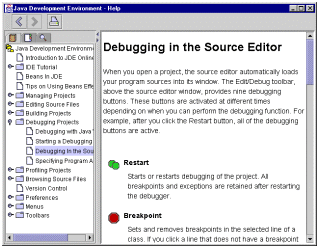
The standard JavaHelp system viewer consists of a toolbar and two panes:
| Content pane | Displays help topics formatted using HTML 3.2, plus embedded lightweight Java components. |
| Navigation pane | A tabbed interface that allows users to switch between the table of contents, index, and full text search displays. |
Collapsible/expandable display of topics in the help system. Supports unlimited levels and merging of multiple TOCs. The underlying file format follows World Wide Web Consortium (W3C) standards. The TOC display is synchronized with the content viewer--the topic being displayed is highlighted in the TOC.
Supports merging of multiple indexes. The underlying file format follows World Wide Web Consortium (W3C) standards. The index display is synchronized with the content viewer--the topic being displayed is highlighted in the index.
The flexible full-text search engine can be used in a variety of network environments. Matches returned from searches are ranked for relevancy using "relaxation rules."
The standard JAR format is used to encapsulate the help information into a single, compressed file. The JavaHelp system works equally well with help information that is not compressed into JAR files--this flexibility allows authors to view files during development without taking the time to compress them.
Help windows (individually or in combination) can be embedded directly into application interfaces.
Help can be activated from within programs using a number of different mechanisms.
Flexible packaging of help information for product delivery makes it easy to incrementally update help information in the field.
The JavaHelp system is designed to permit great flexibility in customizing both the user interface and functionality.
Help information from different sources can be combined and presented to the end user.
The JavaHelp API permits a JavaBeans component to specify help information that can be presented to the end user (perhaps merged with additional information).
 Next Overview Topic:
Descriptive Scenarios
Next Overview Topic:
Descriptive Scenarios